Chasing late payments is the part of freelancing nobody warns you about. You do great work, send a polite email with a PDF attached, and then… silence. The best invoicing software for freelancers fixes that: professional invoices, automatic reminders, and one-click card payments that make it embarrassingly easy for clients to pay you on time. I compared the five strongest options on price, fees, and freelancer-specific features using published pricing and expert reviews (checked October 2026) — here is what is actually worth your money.

What to look for in the best invoicing software for freelancers
Before the picks, a quick reality check on what matters. Freelancers are not small businesses with payroll departments — you need a tool built for one person sending invoices, not an enterprise suite you will use 5% of. The features that actually move the needle:
Online payments built into the invoice. This is the single biggest factor in getting paid fast. An invoice with a “Pay now” button beats a PDF with bank details every time. Check the processing fee, though — 2.9% plus a flat fee is standard, and that flat fee stings on small invoices.
Automatic payment reminders. Nobody likes sending “just bumping this” emails. Good software sends polite, scheduled reminders for you, which is worth the subscription price alone if you have ever lost a weekend to invoice anxiety.
Time tracking that feeds invoices. If you bill by the hour, your timer and your invoice should be the same system. Re-typing hours from a spreadsheet is how billing errors happen.
Tax-ready records. Come April (or whenever your tax deadline hits), you want clean income records and expense categories — ideally sorted toward your tax forms. If you are still deciding on your setup, our guide to LLC vs sole proprietorship breaks down how your business structure affects what you owe.
Honest pricing. Watch for per-client caps, per-seat fees, and promotional prices that triple after three months. Every price below is the standard list price, checked October 2026 — not an intro offer.
The 5 best invoicing software picks for freelancers in 2026
Here they are, ranked by how well they fit the way freelancers actually work — not by marketing budget.
1. FreshBooks — best overall for freelancers who bill clients
FreshBooks has been the freelancer favorite for over a decade, and the core reason has not changed: it is the easiest of the paid tools to go from “new client” to “paid invoice.” Time tracking, proposals, invoicing, and expenses live in one clean dashboard, and the invoice templates look genuinely professional without any design effort.
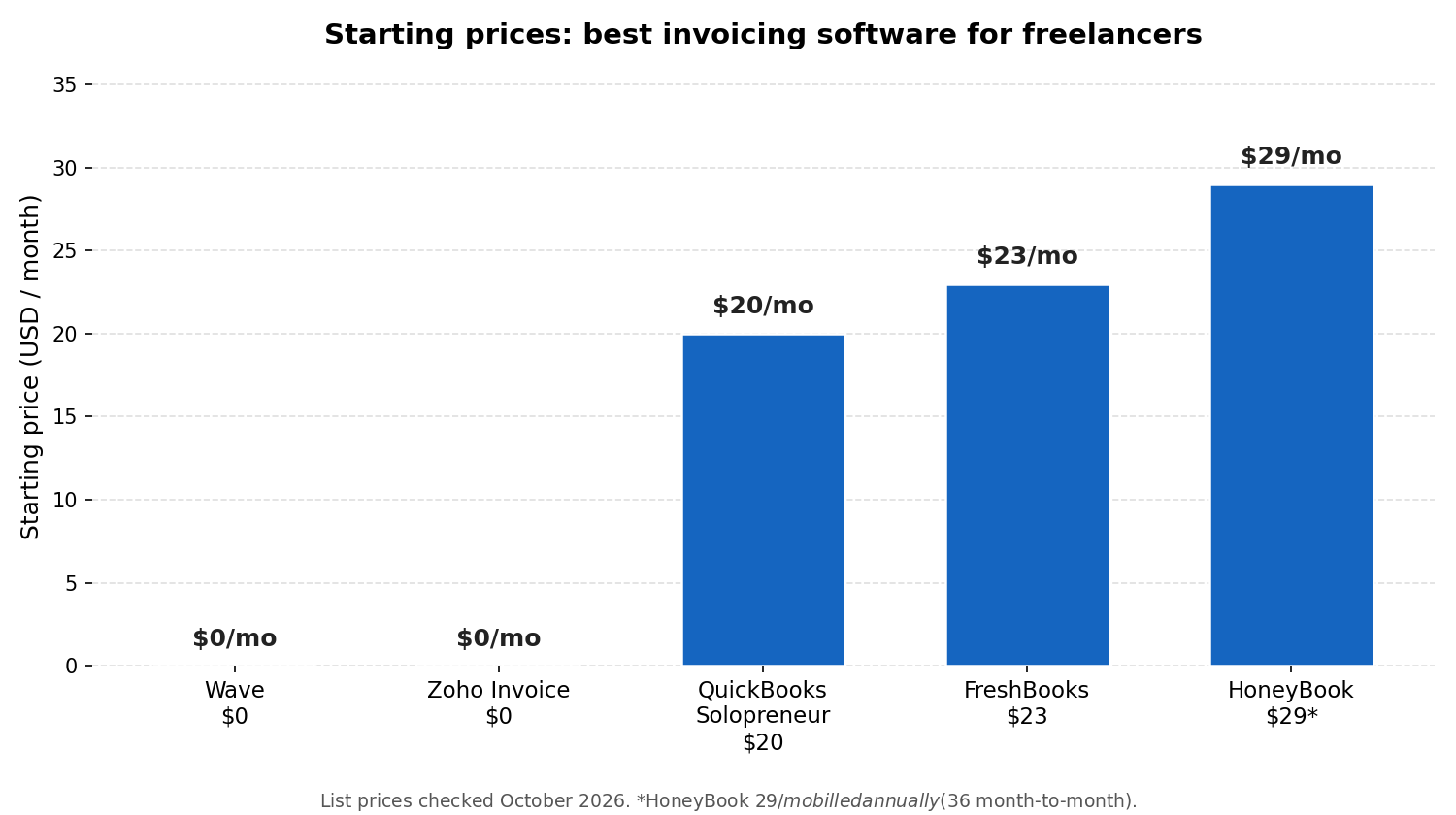
Pricing (checked Oct 2026): Lite is $23/month for up to 5 billable clients, Plus is $43/month for up to 50, and Premium is $70/month for unlimited clients. Annual billing knocks 10% off. There is a 30-day free trial with no credit card required, but no permanent free plan — see FreshBooks’ 2026 pricing update for the official numbers.
Payments: 2.9% + $0.30 per card transaction, 1% for bank transfers. Each extra team member costs $11/month.
Why it wins: The time-to-invoice workflow is unmatched — track hours on your phone, convert them to an invoice in two taps, and automatic late-payment reminders chase the client for you. “Tax Time” reports on every plan make year-end bookkeeping far less painful.
Watch out: Lite’s 5-client cap is tight; if you juggle more than five active clients, you are really buying the $43 Plus plan. Recurring invoices and bank reconciliation also start at Plus, so Lite is a true starter tier, not a full product.
2. Wave — best free invoicing software for freelancers
Wave is the rare tool that is free where it counts. The Starter plan costs $0 and includes unlimited invoices, estimates, bills, and double-entry bookkeeping records — no caps on invoice volume, which no other free tool matches. If your freelance finances are basically “money in, money out,” Wave covers them at zero subscription cost.
Pricing (checked Oct 2026): Starter is $0/month. Pro is $19/month (or $190/year) and adds automatic bank imports, auto-categorization, receipt capture, automated payment reminders, and user roles. The numbers above come from CPA Advisor’s Wave review of September 2026 list prices.
Payments: This is where Wave makes its money: 2.9% + $0.60 per card transaction (1% for ACH bank payments). That $0.60 flat fee is double most competitors’, so on small invoices the “free” plan quietly costs you. Pro waives the $0.60 on your first 10 card transactions a month.
Why it wins: Genuinely free invoicing plus real double-entry accounting — not a crippled trial. For a freelancer sending under 20 invoices a month, nothing else touches it on value.
Watch out: No time tracking, so hourly billers should look elsewhere. Automated reminders and bank feeds require Pro. Wave also only supports US and Canadian businesses, and receipt scanning is a paid add-on ($11/month on Starter).
3. Zoho Invoice — best free invoicing for international freelancers
Zoho Invoice is completely free — not a trial, not a freemium tease. Zoho’s own FAQ describes it as forever-free invoicing with no subscription fees or hidden costs, a claim backed up by Zoho’s FAQ confirming Invoice is forever free. What sets it apart from Wave is the international polish: multi-currency invoicing, templates in 17 languages, and automated payment reminders on the free plan.
Pricing (checked Oct 2026): $0, with published usage limits — sources cite up to 1,000 invoices per year and 2 users per organization. G2’s 2026 pricing page lists it as “100% free. Forever.”
Payments: Zoho does not process payments itself; it connects to your Stripe, PayPal, or other gateway, so you pay whatever your gateway charges. That is worth comparing against Wave’s 2.9% + $0.60 — depending on your gateway, Zoho can be cheaper per transaction.
Why it wins: Time tracking, expense recording, recurring invoices, a client self-service portal, and project billing — all free, all in one tool. For freelancers with clients in multiple countries, the multi-currency support alone makes it the pick.
Watch out: It is invoicing only, not full accounting — when you outgrow it, Zoho’s upgrade path is the paid Zoho Books. The interface feels dated next to FreshBooks, and heavy users will eventually hit the invoice and user caps.
4. QuickBooks Solopreneur — best invoicing software for tax-minded freelancers
If your biggest annual headache is taxes rather than invoices, QuickBooks Solopreneur is built for you. It is Intuit’s direct replacement for the old QuickBooks Self-Employed, designed around one-person businesses: income and expenses auto-sorted into Schedule C categories, quarterly estimated tax calculations, mileage tracking, and a clean handoff to TurboTax at filing time.
Pricing (checked Oct 2026): $20/month flat — no tiers, no per-client caps. Fit Small Business’ QuickBooks comparison confirms the $20 figure against the rest of the QuickBooks lineup.
Payments: Standard QuickBooks payment processing applies (around 2.9% + a fixed fee per card transaction); you can also invoice without online payments enabled.
Why it wins: Nobody else in this price range thinks about taxes this hard. The quarterly tax estimates alone can save a freelancer from an underpayment penalty, and if your accountant already lives in QuickBooks, handing over clean books is frictionless.
Watch out: It is the weakest pure invoicing tool on this list — fewer templates, no proposals, no time tracking worth mentioning. There is no accountant access on the plan, and note that once you upgrade to a full QuickBooks Online plan, Intuit does not let you switch back to Solopreneur. If your business structure is getting complicated, read our S corp vs LLC breakdown before you lock into a tax workflow.

5. HoneyBook — best for creative freelancers with a client pipeline
HoneyBook is not really invoicing software — it is a client workflow platform that happens to invoice beautifully. If your work runs “inquiry → proposal → contract → scheduled session → payment” (photographers, designers, coaches, event pros), HoneyBook manages the entire chain: branded proposals, e-sign contracts, scheduling, automations, and invoices in one client portal.
Pricing (checked Oct 2026): Starter is $36/month billed monthly or $29/month billed annually ($348/year); Essentials is $59/$49; Premium is $129/$109. All plans include unlimited clients and projects. Pricing per The Plain Manual’s HoneyBook pricing breakdown of October 2026 list prices. Note: HoneyBook raised Starter prices sharply in early 2025, so older reviews quoting $19/month are out of date.
Payments: 2.9% + $0.25 for Visa/Mastercard, 3.4% + $0.09 for Amex, Discover, and card-on-file payments, and 1.5% for ACH bank transfers.
Why it wins: For client-facing creatives, the proposal-to-payment flow is the most polished in the business. Contracts and invoices live together, so nothing falls through the cracks between “yes” and “paid.”
Watch out: It is overkill — and overpriced — if you just need to send invoices. There is no free plan (only a trial), automation and scheduling require the $49+/month Essentials tier, and it only serves businesses in the US, Canada, the UK, and Australia. Pure writers and developers billing hourly will get more from FreshBooks at a lower price.
The 5 best invoicing software options, compared
Side by side on the numbers that matter — all prices checked October 2026:
| Software | Starting price | Free tier | Payment processing | Tax features | Best for |
|---|---|---|---|---|---|
| FreshBooks | $23/mo (Lite) | 30-day trial only | 2.9% + $0.30 card; 1% bank transfer | Tax Time reports; mileage on all plans | Client-based freelancers who bill hourly |
| Wave | $0 (Starter) | Yes — unlimited invoices | 2.9% + $0.60 card; 1% ACH | P&L and standard reports; no mileage | Budget freelancers with simple billing |
| Zoho Invoice | $0 forever | Yes — limits on invoices/users | Via your gateway (Stripe/PayPal) | Expense tracking; reports | International freelancers, multi-currency |
| QuickBooks Solopreneur | $20/mo | Trial only | ~2.9% + fixed fee per card | Schedule C sorting; quarterly estimates; TurboTax handoff | Tax-focused solo freelancers |
| HoneyBook | $29/mo (annual) | Trial only | 2.9% + $0.25 card; 1.5% ACH | Basic reports | Creative freelancers with client pipelines |
How these picks were chosen
Transparency matters in a review roundup, so here is the method: these five picks are based on each vendor’s published pricing and feature pages, independent expert reviews, and aggregated user ratings — all checked in October 2026. I did not personally run a freelance business through all five tools, and any review that claims weeks of hands-on testing of every product without showing the work deserves skepticism. What I did do is verify every price and fee above against a current source, flag where sources disagree, and rank the tools by fit for freelance workflows rather than feature-count.
FAQs: invoicing software for freelancers
Is there really free invoicing software for freelancers?
Yes — two genuinely free options made this list. Wave’s Starter plan ($0) includes unlimited invoices and bookkeeping, funded by its payment processing fees. Zoho Invoice is completely free with published limits on invoices and users. Both are real products used by thousands of freelancers, not bait-and-switch trials.
How much should a freelancer pay for invoicing software?
Between $0 and $36/month covers every freelancer on this list. Start free with Wave or Zoho Invoice; move to FreshBooks Lite ($23/month) when you need time tracking and automation, or QuickBooks Solopreneur ($20/month) when taxes become the priority. Paying more than $40/month only makes sense once you need client-pipeline tools like HoneyBook’s.
Do I need accounting software or just invoicing software?
If you only send invoices and track expenses, invoicing software is enough — Wave even bundles basic double-entry books for free. Step up to accounting software (or a tax-focused tool like QuickBooks Solopreneur) when you need tax estimates, detailed financial reports, or your accountant asks for proper books. Many freelancers pair a free invoicing tool with a spreadsheet for their first year.
Which invoicing software is best for taxes?
QuickBooks Solopreneur, by a clear margin — Schedule C expense categories, quarterly estimated tax calculations, mileage tracking, and TurboTax integration are built for US solo filers. FreshBooks is the runner-up with its Tax Time reports on every plan.
Can clients pay my invoices by credit card?
Yes, on all five tools — but compare the fees before you switch them on. Expect roughly 2.9% plus a flat fee ($0.25–$0.60) per card payment, and around 1–1.5% for bank transfers. On small invoices the flat fee matters more than the percentage: a $50 invoice costs about $1.75 to process on FreshBooks (2.9% + $0.30) versus $2.05 on Wave (2.9% + $0.60) — so compare your average invoice size across tools, and nudge regular clients toward bank transfer where the fee is lower.
Should freelancers still use QuickBooks Self-Employed in 2026?
QuickBooks Self-Employed has been replaced by QuickBooks Solopreneur ($20/month) — that is the product Intuit now sells to one-person businesses, and it is the one covered in this roundup. If you are on a grandfathered Self-Employed plan, it still works, but new signups go to Solopreneur.
The bottom line
The best invoicing software for freelancers is the one that gets you paid with the least friction. For most freelancers, that is FreshBooks if you bill clients regularly and want automation, Wave if you want to pay $0, Zoho Invoice if your clients span currencies, QuickBooks Solopreneur if taxes keep you up at night, and HoneyBook if your business is really a client pipeline. Start with the free options, upgrade when the admin work you are avoiding costs more than the subscription — and if you are also selling digital products on the side, our Shopify or Etsy comparison can help you pick that platform too.