
What Is Wi-Fi 7? A Plain-English Guide and Whether You Need It
Your phone buffers a 4K video while your kid’s VR headset eats bandwidth and your video call stutters at the worst possible moment. The router box in the hallway promises “up to 50 Gbps!” and you’re left wondering if any of it is real. That raises the question — what is wifi 7, exactly, and does your home actually need it?
The short answer: Wi-Fi 7 is the newest generation of the wireless standard that connects your devices to your router. It brings wider channels, denser signals, and the ability to use multiple frequency bands at once. The catch? The headline speed of 46 Gbps is a laboratory maximum, not something you’ll ever see in your living room. This guide strips away the marketing and explains what Wi-Fi 7 actually does, what it really costs, and who should upgrade in 2026 — in plain English.
So, What Is Wifi 7? The Plain-English Definition
Wi-Fi 7 is the friendly name for IEEE 802.11be, the seventh generation of the Wi-Fi standard (the IEEE also calls it “Extremely High Throughput,” or EHT). Just as Wi-Fi 6 was 802.11ax and Wi-Fi 5 was 802.11ac, the number simply marks the latest round of improvements to the same technology you’ve been using for decades.
Put simply, the short answer to what is wifi 7 is this: it’s a smarter, faster, more reliable way for your devices to talk to your router. The Wi-Fi CERTIFIED 7 program launched in 2024, and by 2026 the technology has moved from early-adopter gear into mainstream routers, phones, and laptops — the Wi-Fi Alliance projects some 1.4 billion Wi-Fi 7 chipset shipments this year.
Wi-Fi 7 works on the same three bands as before: 2.4 GHz (long range, lower speed), 5 GHz (medium), and 6 GHz (short range, fastest). Your old phone from 2019 will still connect to a Wi-Fi 7 router perfectly fine — it just uses its own older standard while newer devices use the faster features. Backward compatibility is built in.

The Three Big Technologies Behind Wi-Fi 7
Most people asking what is wifi 7 hear “faster” and stop there. But Wi-Fi 7 is really three upgrades bundled together. Understanding them tells you whether any of this matters for your home.
320 MHz Channels: Twice as Wide a Highway
Think of a wireless channel like a highway. Wi-Fi 6 used channels up to 160 MHz wide — a four-lane road. Wi-Fi 7 doubles that to 320 MHz, essentially an eight-lane highway that can move far more data at once. According to the Wi-Fi Alliance, 320 MHz channels in the 6 GHz band provide twice the throughput of Wi-Fi 6, enabling multigigabit device speeds.
The catch: those super-wide channels only fit in the 6 GHz band, which has shorter range and struggles through walls. In a studio apartment, you’ll feel it. In a big house with the router in the basement, your devices may rarely use them.
4K QAM: Packing More Into Every Signal
QAM (quadrature amplitude modulation) is how tightly data is packed into each wireless signal. Wi-Fi 6 packed 10 bits per signal using 1024-QAM. Wi-Fi 7 packs 12 bits per signal using 4096-QAM — “4K QAM” — and the Wi-Fi Alliance notes this achieves 20% higher transmission rates than Wi-Fi 6’s 1024 QAM.
The trade-off: denser packing is more fragile. Your device only gets the full 4K QAM benefit when it has a strong, clean signal — basically, when you’re in the same room as the router. Step two rooms away and the router quietly drops back to simpler modulation.
Multi-Link Operation: Using Two Bands at Once
This is the genuinely new idea. Older Wi-Fi made your phone pick one band — say, 5 GHz — and stick with it. Multi-Link Operation (MLO) lets a Wi-Fi 7 device connect across multiple bands (2.4, 5, and 6 GHz) simultaneously, sending and receiving on all of them at the same time. If one band gets congested or a signal dips, traffic shifts to the other link without dropping.
As one router maker’s guide puts it, MLO dramatically improves throughput, lowers latency, and keeps the connection stable when networks get crowded (Multi-Link Operation (MLO) explained). For real-world use — a busy apartment building with 40 neighboring networks, or a house with 50 smart devices — MLO is the feature you’ll actually feel, even more than raw speed.
Wi-Fi 7 vs Wi-Fi 6 and 6E: The Real Numbers
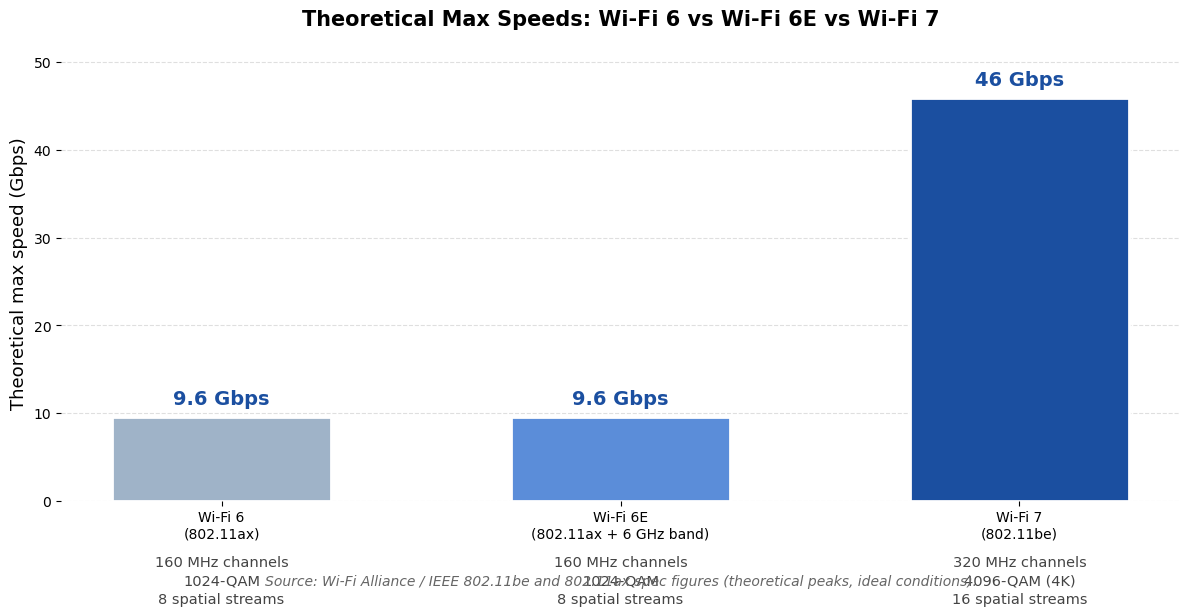
Here’s the honest comparison, using the standards’ official theoretical maximums (laboratory ceilings, not living-room promises):
- Wi-Fi 6 (802.11ax): 9.6 Gbps max, 160 MHz channels, 1024-QAM, 8 spatial streams
- Wi-Fi 6E (802.11ax + 6 GHz): 9.6 Gbps max — same ceiling, but adds the clean 6 GHz band
- Wi-Fi 7 (802.11be): 46 Gbps max, 320 MHz channels, 4096-QAM, 16 spatial streams
So yes, Wi-Fi 7’s ceiling is roughly five times higher than Wi-Fi 6’s 9.6 Gbps. It also doubles the spatial streams from 8 to 16, meaning the router can juggle more devices simultaneously.
But here’s the number that matters more: your internet plan. Most homes pay for 300 Mbps to 2 Gbps from their internet provider. Your router can only deliver what the plan supplies — a 46 Gbps Wi-Fi link feeding a 1 Gbps internet connection is like a Formula 1 engine in a school zone. The extra headroom helps with local traffic (moving files between devices in your home) and with keeping dozens of devices happy at once, but it won’t make Netflix stream faster than your plan allows.
Why Latency Is the Real Upgrade (Gaming, VR, and AR)
If speed is the marketing headline, latency is the substance. Latency is the delay between tapping a button and something happening — and it’s what makes a game feel snappy or sluggish, or a VR headset feel nauseating.
MLO is the big reason Wi-Fi 7 cuts latency: with links on multiple bands active at once, data doesn’t wait its turn in a single queue. Features like restricted target wake time (rTWT) further let the router reserve guaranteed time slots for latency-sensitive traffic. In ideal conditions, 802.11be targets latency down in the single-digit milliseconds — a meaningful step from Wi-Fi 6’s typical wireless latency.
Who feels this? Competitive gamers on Wi-Fi, wireless VR headset users (a single stuttered frame breaks immersion), and anyone on video calls in a congested apartment. If your household runs VR, cloud gaming, or 8K streams, low latency matters far more than a 46 Gbps speed number you’ll never touch.

Device and Router Support in 2026
A Wi-Fi 7 router alone doesn’t unlock Wi-Fi 7’s features — your phone, laptop, and other devices need Wi-Fi 7 radios too. The good news: by 2026, support is mainstream.
Phones: Flagship phones have shipped Wi-Fi 7 since 2024. Apple’s iPhone 16 lineup was its first with Wi-Fi 7, and Samsung’s Galaxy S24 and S25 series, the Google Pixel 9 line, OnePlus 12 and newer flagships, and Xiaomi’s 14 series all support it. Android 13 and later provide system-level Wi-Fi 7 support, so the plumbing is standard on modern Android.
Laptops: Wi-Fi 7 is now standard on premium notebooks. Intel’s Meteor Lake and Lunar Lake platforms ship with Wi-Fi 7 chipsets, Qualcomm’s Snapdragon X series (used in Copilot+ PCs like the Surface Pro 11 and Surface Laptop 7) includes it, and Apple’s MacBook Pro with M4 chips supports Wi-Fi 7. Most 2024+ gaming and premium ultrabooks from ASUS, Dell, HP, and Lenovo have it.
Routers: Every major brand now sells Wi-Fi 7. Entry-level options like the TP-Link Archer BE230 start around $89–99, mid-range tri-band models like the Archer BE550 run about $199, and flagships like the ASUS RT-BE96U (~$500) or NETGEAR Nighthawk RS700S (~$700) target homes with multi-gigabit fiber. Mesh systems — TP-Link Deco, NETGEAR Orbi 970, eero Max 7 — bring Wi-Fi 7’s backhaul benefits to large homes, since MLO also improves the wireless link between mesh nodes.
Before you buy anything, audit what you own. A brand-new Wi-Fi 7 router paired with a five-year-old phone gives you… Wi-Fi 5 speeds to that phone. If most of your devices are a few years old, your bottleneck isn’t the router.
Should You Upgrade Now or Wait?
So after all that, what is wifi 7 worth to you personally? Run through this quick checklist:
Upgrade now if:
- Your internet plan is 1 Gbps or faster — you have bandwidth worth delivering
- You already own several Wi-Fi 7 phones or laptops to take advantage of it
- You game competitively, use wireless VR, or move large files between devices at home
- Your home has 30+ connected devices competing for airtime
- Your current router is Wi-Fi 5 or older and due for replacement anyway
Wait if:
- Your internet plan is under 500 Mbps — Wi-Fi 7 can’t add speed your provider doesn’t sell
- Your router is a decent Wi-Fi 6 or 6E model from the last three years
- Most of your devices are older and don’t support Wi-Fi 7
- Your actual problem is dead zones — a mesh system (even Wi-Fi 6) fixes coverage better than a single Wi-Fi 7 router in a corner
One more honest note: if you already own a Wi-Fi 6E router, the step to Wi-Fi 7 is small. Both use the 6 GHz band; the gains are MLO and wider channels. If you’re on Wi-Fi 5 or older, the jump is significant and worth considering next time you replace hardware.
Wi-Fi 7 Buying Checklist
Ready to buy? Check these five things before you spend a dollar:
- Match the router to your internet plan. Gigabit plan? A ~$200 tri-band model like the TP-Link Archer BE550 with 2.5 Gbps ports is plenty. Multi-gigabit fiber? Then look at flagships with 10 Gbps ports. For a full rundown of 2026’s options, see this guide to Wi-Fi 7 routers and the best Wi-Fi 7 routers for 2026.
- Insist on the 6 GHz band. Some cheap “Wi-Fi 7” routers are dual-band (2.4 + 5 GHz only) and skip 6 GHz entirely — which also means no 320 MHz channels, the headline feature. Tri-band is the real deal.
- Check the wired ports. A router advertising multigigabit wireless with only 1 Gbps Ethernet ports is bottlenecking itself. Look for at least 2.5 Gbps ports.
- Fix placement first. A router shoved behind the TV in a corner will underperform no matter the standard. Central, elevated, and away from metal beats any spec sheet — and if coverage is the real problem, try these steps to boost your WiFi signal at home before buying anything.
- Check your devices. Sometimes the slowdown isn’t the network at all. An aging laptop with a full disk and 40 startup apps will feel slow on any router — try these steps to speed up a slow laptop first and see if the router was ever the problem.
FAQs
Is Wi-Fi 7 backwards compatible with older devices?
Yes. A Wi-Fi 7 router happily connects to devices using Wi-Fi 6, 5, 4, or even older standards. Your older gear simply connects using its own best standard — a Wi-Fi 5 phone won’t magically get Wi-Fi 7 speeds, but it will work exactly as before.
Do I need Wi-Fi 7 devices to benefit from a Wi-Fi 7 router?
For the headline features — MLO, 320 MHz channels, 4K QAM — yes, both the router and the device must support Wi-Fi 7. Older devices still benefit indirectly: the router’s better radios and processing can make the whole network slightly more efficient, but the big gains go to Wi-Fi 7 clients.
Is Wi-Fi 7 worth it if my internet plan is slow?
Not really. If your plan is 100–300 Mbps, a Wi-Fi 7 router can’t make downloads exceed that. Your money is better spent on a good Wi-Fi 6 router with solid coverage, or fixing placement. Wi-Fi 7 starts paying off around gigabit plans and above.
What’s the difference between Wi-Fi 6E and Wi-Fi 7?
Wi-Fi 6E was Wi-Fi 6 plus the 6 GHz band — same 9.6 Gbps ceiling, just cleaner spectrum. Wi-Fi 7 adds genuinely new tricks on top: 320 MHz channels, 4096-QAM, Multi-Link Operation, and 16 spatial streams. If you already own a 6E router, upgrading to 7 is a modest step; from Wi-Fi 5, it’s a big one.
Does Wi-Fi 7 drain phone batteries faster?
It shouldn’t — arguably the opposite. Wi-Fi 7’s efficiency features (improved target wake time and faster data transfer that lets radios sleep sooner) can actually save power. That said, heavy streaming will always use battery, so pair it with good habits — here’s how to make your iPhone battery last longer.
Will Wi-Fi 7 work with smart home devices?
Yes — most smart bulbs, plugs, and cameras use the 2.4 GHz band with older Wi-Fi standards, and Wi-Fi 7 routers support them all. Wi-Fi 7’s real gift to smart homes is capacity: with 16 spatial streams and MLO, dozens of chattering IoT devices interfere with your laptop less.
Conclusion
Now that you know what is wifi 7 — and what it isn’t — the decision is simpler than the marketing makes it look. The 46 Gbps headline is a theoretical peak you’ll never reach. But Multi-Link Operation, lower latency, and room to grow with dozens of devices are real, practical improvements that are already in mainstream gear at mainstream prices.
If your internet plan is a gigabit or more, you own recent Wi-Fi 7 devices, and your current router is aging out, 2026 is a perfectly reasonable time to upgrade. If your plan is modest, your devices are older, or your real problem is a dead zone at the back of the house, spend your money on coverage and placement instead.
Either way, you now know exactly what that box on the shelf is promising — and whether your home is ready to make use of it.