

The commute is gone, the dress code is pajamas, and your office is ten steps from your bed. So why is it so hard to learn how to be more productive working from home? For most remote workers, the problem isn’t laziness — it’s structure. The office used to provide it for free: the commute that switched your brain on, the desk that meant “work happens here,” the colleagues who noticed when you drifted. At home, you have to build all of that yourself.
The good news: productivity at home is a system, not a personality trait. Below are nine practical strategies — from a workspace your brain takes seriously to a shutdown ritual that lets you switch off without guilt. No expensive gear or superhuman discipline required.

Why Learning How to Be More Productive Working From Home Starts With Structure
Before fixing the problem, it helps to name it. When you work from home, three things that used to happen automatically now need deliberate effort:
- Context switching disappears — in a bad way. Your brain uses physical cues to switch modes. Kitchen table means breakfast; couch means Netflix. When every activity happens in the same two rooms, your brain never gets a clear “work mode” signal.
- Distractions multiply. Laundry, dishes, the dog, the doorbell, a quick scroll through your phone “just for a minute.” Each one is small; together they shred your attention into confetti.
- Boundaries blur. Without a commute, work leaks into the evening and life leaks into the workday. You end up half-working for ten hours instead of fully working for seven.
The fix for all three is the same: rebuild the structure the office used to give you, deliberately and on purpose. Here’s how.
1. Design a Dedicated Workspace That Signals “Work Mode”
This is the single highest-leverage change most remote workers can make. Your brain forms associations fast. If you answer emails from the couch, your couch becomes a low-grade stress trigger. If you work from bed, your sleep suffers — and your focus never fully arrives.
You don’t need a separate room. A consistent corner works. What matters is that the spot is used for work and (almost) nothing else. When you sit down there, your brain should get the message: it’s time.
Make it work in a small space
- Claim one surface. A desk, a specific end of the dining table, a fold-down wall desk. Consistency beats square footage.
- Face away from household traffic if you can. Every person walking past is an attention tax.
- Invest in the chair before anything else. A decent ergonomic chair costs less than a new laptop and pays for itself in comfort and focus within weeks. Check OSHA’s ergonomics guidance for workstation setup basics.
- Control light and noise. Natural light near your workspace, and a pair of noise-cancelling headphones or even simple earplugs, can transform a chaotic flat into a workable office.
Keep the workspace boring on purpose. One notebook, one water bottle, the tools you need. Every object in view is a potential distraction competing for a slice of your attention.
2. Build a Morning Startup Ritual
Commuters get a free psychological transition: the drive or train ride tells the brain the workday is starting. Remote workers need to manufacture one. A startup ritual is a short, repeatable sequence — 15 to 30 minutes — that ends with you at your desk, ready to work.
Here’s a template that works well:
- Get dressed like you’re leaving the house. Not a suit — just real clothes. It sounds trivial; it isn’t. Changing out of sleepwear is one of the strongest “day has started” signals you can give yourself.
- Do one physical thing. A ten-minute walk, stretching, making the bed properly. Movement wakes up the brain faster than coffee.
- Review your top three priorities. Before opening email, write down the three things that would make today a win. This is the heart of the ritual — everything else is preparation for it. If journaling helps you think, our guide on how to start journaling for beginners pairs well with this habit.
- Start with the hardest task. Momentum from an early win carries the whole morning.
The ritual itself matters less than its repeatability. Same order, same time, every workday. Within two weeks, step one will start triggering focus automatically.
3. Work in 90-Minute Deep-Work Blocks
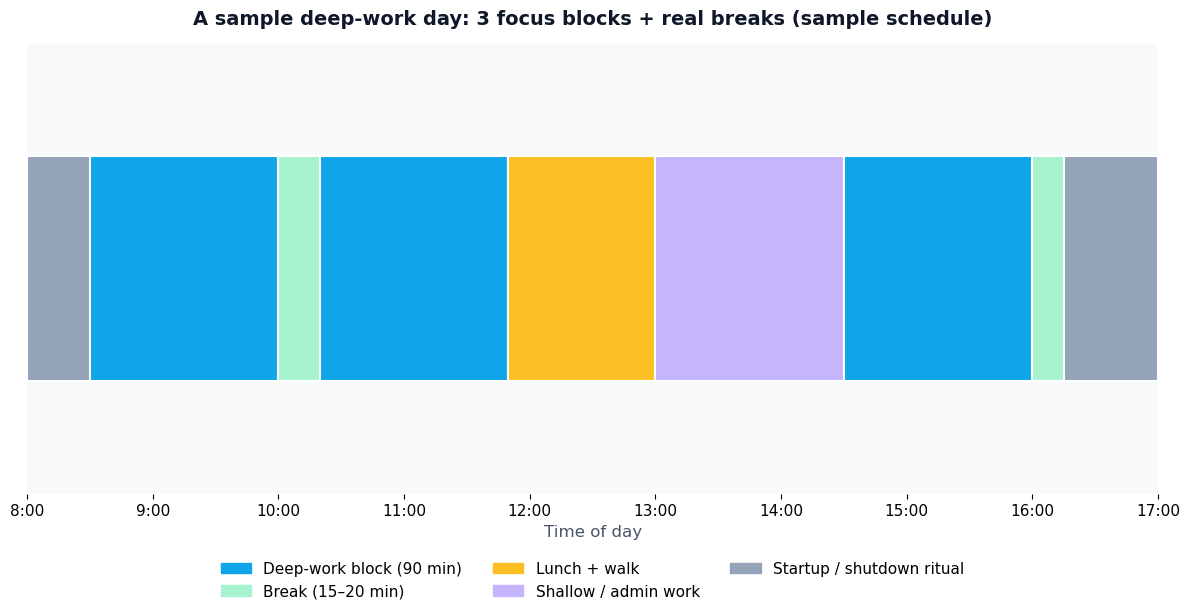
Here’s the core technique behind most genuinely productive remote workers: stop treating the day as one long stretch of “work” and start treating it as a small number of focused sprints separated by real breaks.
Human attention runs in roughly 90-minute cycles — periods of high focus followed by a natural dip. Fighting the dip with more coffee just produces jittery, shallow work. Riding the cycle instead looks like this:
- 90 minutes of single-task focus on one meaningful task. Phone in another room. Notifications off. One tab set, one document.
- 15–20 minutes of genuine break. Walk, stretch, snack, stare out the window. Not “break” spent scrolling news — that doesn’t restore attention.
- Repeat 2–3 times per day. Three solid 90-minute blocks is about four and a half hours of deep work — more real output than most office workers produce in eight.
Protect these blocks like meetings with your most important client — because they are. Put them on your calendar, tell your household, and let colleagues know you’re unreachable during them. Shallow work (email, admin, messages) gets its own smaller windows between blocks, never inside them.
4. Batch Your Shallow Work
Email, Slack messages, expense reports, scheduling — shallow work is necessary, but it’s also where entire afternoons go to die. The problem isn’t the tasks; it’s that they arrive as constant interruptions, each one yanking you out of whatever you were doing.
The fix is batching: collect shallow work into two or three dedicated windows per day and ignore it the rest of the time.
- Check email twice a day — late morning and mid-afternoon, for example. Not first thing; email is other people’s priorities, and starting there hands your morning to strangers.
- Keep a running “shallow list.” When a small task pops into your head during a focus block, jot it on the list and return to the real work. Process the list in your next shallow window.
- Set expectations. Tell your team you reply to messages at set times. Most “urgent” messages survive a two-hour wait just fine — and the ones that don’t will come via phone.
5. Kill Notifications and Digital Distractions
Your phone is the single biggest threat to working from home productively. Even the presence of a phone on the desk reduces available focus — and every buzz or banner shatters whatever concentration you’ve built.

- Phone goes in another room during deep-work blocks. Not face-down on the desk — another room. Out of sight genuinely means out of mind.
- Turn off all non-human notifications. News alerts, social media, shopping apps — none of them deserve real-time access to your attention. Keep calls and texts from actual people; mute everything else.
- Use a website blocker during focus time. Tools like Freedom block distracting sites across all your devices on a schedule, so willpower isn’t required in the moment.
- Close the tabs. If your browser has 30 tabs open, each one is an open loop in your head. Bookmark them, close them, and work with five or fewer.
This isn’t about digital minimalism as a lifestyle — it’s a tactical move. You’re not giving up your phone; you’re putting it on a schedule, the same way you’d schedule anything else that matters.
6. Set Boundaries With Your Household
One of the hardest parts of remote work is that the people you live with can see you, so they assume you’re available. “You’re home, can you just…” is the enemy of every focus block.
Have the explicit conversation — once, clearly, kindly:
- Define your working hours and put them somewhere visible. A closed door (or headphones on) means “at the office, do not disturb unless it’s genuinely urgent.”
- Explain what “urgent” means. Fire, flood, blood. Everything else waits for a break.
- Give them your schedule. People interrupt less when they can see you’ll be free at 10:20, 12:00, and 3:00. Predictability kills the urge to “just ask quickly.”
- Protect their time too. Boundaries cut both ways. When the workday ends, be fully present — that’s the deal that makes the daytime boundaries stick.
With young kids at home, be realistic: shift deep work to naps, early mornings, or evenings, and treat kid-waking hours as shallow-work time. That’s not failure — it’s planning around reality.
7. Manage Your Energy, Not Just Your Time
Here’s something office culture gets wrong: not all hours are equal. Your focus, creativity, and willpower follow a daily rhythm, and scheduling against that rhythm is like swimming upstream.
Most people hit peak analytical focus in the late morning, experience a dip after lunch, and get a smaller second wind in the late afternoon. Map your tasks to your energy:
- Peak hours → hardest work. Writing, coding, strategy, anything that needs real thinking goes in your best 90-minute block.
- The post-lunch dip → shallow work or movement. Emails, admin, a walk. Don’t schedule your most demanding task for 2 p.m. and then wonder why you’re struggling.
- Protect your sleep ruthlessly. Everything above collapses on poor sleep. If your energy is chronically low, the problem may not be your schedule — it may be your nights. Our guide on how to sleep better naturally covers the fundamentals.
Track your energy for one week — a simple 1–5 score each hour in a notebook. Patterns jump out fast, and you’ll stop fighting your own biology. People who work night shifts already know this lesson: you can’t brute-force alertness at the wrong biological hour.

8. Create an End-of-Day Shutdown Ritual
The startup ritual switches work on; the shutdown ritual switches it off. Without one, remote workers tend to either work until they crash or feel vaguely guilty all evening — sometimes both.
Keep it short — ten minutes:
- Review what you finished. Check off completed tasks. Your brain needs the win recorded, or it will replay the day all evening.
- Capture open loops. Dump every unfinished thought onto tomorrow’s list. The goal is an empty head, not a finished workload.
- Set tomorrow’s top three. Future-you will thank present-you at 8 a.m.
- Close the laptop and say a phrase. Seriously — something like “shutdown complete.” It sounds silly, but a verbal marker tells your brain the workday is over. Change into different clothes to reinforce it.
After shutdown, the workspace goes dark. Laptop closed, notifications silenced, work apps logged out. If you can, physically leave the work area — even a walk around the block creates the commute-like boundary your brain is missing.
9. Use the Right Tools (Without Drowning in Them)
Productivity tools help only if they reduce friction instead of adding it. Most remote workers need exactly four:
- A task manager for your top priorities — Todoist and similar apps work because they’re fast to capture into and easy to review.
- A calendar with your blocks on it. If the deep-work block isn’t on the calendar, it doesn’t exist.
- A time tracker (at least for a few weeks) — RescueTime runs quietly and shows you where your hours actually went, which is often sobering and always useful.
- One communication hub agreed with your team. The tool matters less than the agreement about response times.
Start with a notebook and a calendar; add tools only when a specific pain demands one.
What to Do When Motivation Crashes Anyway
Systems beat motivation, but some days the system stalls too. For those days, keep a short emergency list:
- Shrink the task. “Write the report” becomes “write the first paragraph.” Starting is the hard part; momentum handles the rest.
- Change the scenery. One focus block from a café or library can break a multi-day slump.
- Do a 10-minute tidy. Physical order nudges mental order — and it’s a legitimate break, not procrastination, if it’s time-boxed.
- Talk to a human. Isolation quietly drains remote workers. A five-minute call with a colleague or friend can reset your whole afternoon.
If the crash lasts more than a couple of weeks — persistent exhaustion, dread, inability to focus — that’s beyond productivity advice. Burnout is real, and no system fixes it alone; Psychology Today’s therapist directory is one place to start looking for support.
Frequently Asked Questions
How many hours should I work from home each day?
Focus on output, not hours. Most remote workers do their best work in 6–8 hours built around two or three 90-minute deep-work blocks, with shallow tasks filling the gaps. If you’re producing real results in six focused hours, that’s better than ten distracted ones.
How do I stay productive working from home with kids?
Align deep work with naps, school hours, or early mornings, and treat kid-waking hours as shallow-work time. Communicate your schedule to your partner so you can trade off coverage. Be realistic about capacity — planning around reality beats fighting it.
What’s the best morning routine for remote workers?
A short, repeatable startup ritual: get dressed, move your body for ten minutes, write down your top three priorities, then start with the hardest task before opening email. Consistency matters more than the specific activities.
How do I stop procrastinating when working from home?
Shrink the first step until it’s laughably small, put your phone in another room, and commit to just one 90-minute focus block. Procrastination thrives on vague, oversized tasks — specificity and short commitments starve it.
Is working from home actually more productive than the office?
It can be, but only with deliberate structure. Remote workers who use dedicated workspaces, time blocks, and shutdown rituals often outperform office baselines; those who wing it usually don’t. The environment doesn’t make you productive — the system does.
How do I separate work and personal life when working from home?
Use physical and ritual boundaries: a dedicated workspace you leave, a startup ritual that begins the day, and a shutdown ritual that ends it. Change clothes, close the laptop fully, and keep work apps off your personal phone after hours.
The Bottom Line
Learning how to be more productive working from home isn’t about finding the perfect app or forcing more discipline. It’s about rebuilding, piece by piece, the structure the office used to hand you for free: a workspace that means work, a morning ritual that switches you on, deep-work blocks that protect your attention, and a shutdown ritual that lets you rest without guilt.
Start with one change — the dedicated workspace, or the phone in another room — and add the next when the first feels automatic. Small systems, compounded daily, are what turn a spare bedroom into a genuinely productive office.




[…] more stable than wireless. For remote workers especially, a stable connection is the foundation of being productive while working from home — nothing kills focus like a call that keeps […]