

A ceiling fan is one of the smartest room upgrades: it cools you in summer, recirculates warm air in winter, and costs far less than touching your HVAC. Best of all, learning how to install a ceiling fan yourself is a genuinely achievable weekend project — most swaps of an existing light fixture take just one to two hours with basic tools, according to Hunter Fan’s ceiling fan installation guide.
One warning up front: a fan is heavier than it looks, and it spins. Hanging one from the wrong electrical box is a genuine hazard, so this guide spends extra time on the step beginners most often skip — making sure your ceiling box is rated for fan support. Follow the steps in order and don’t rush the safety checks.
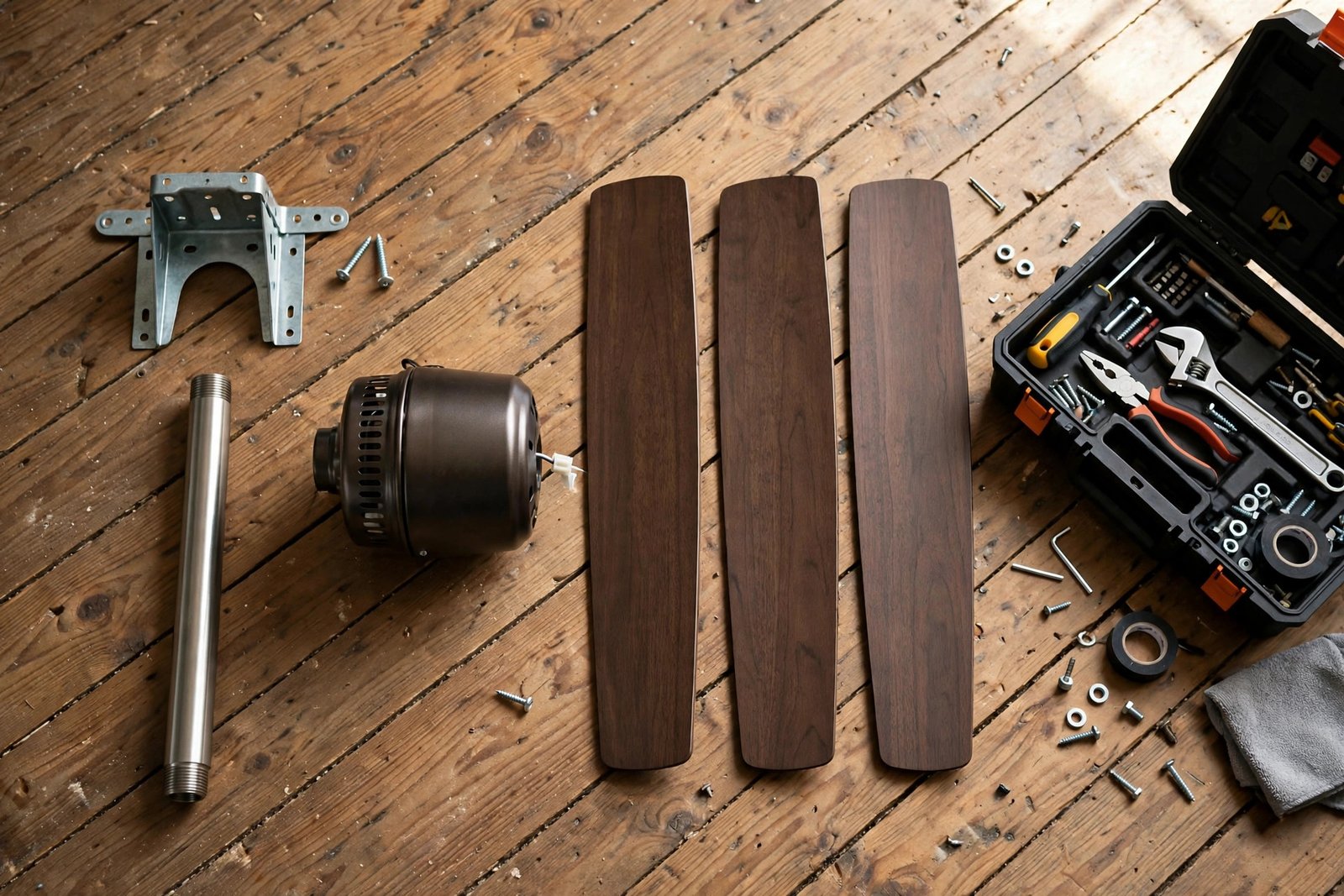
Before You Start: Is Installing a Ceiling Fan a DIY Job?
For most homeowners, yes — with one big condition: you’re replacing an existing fixture that already has wiring. The wiring is simple color-to-color matching, and the rest is tightening screws from a ladder.
Call a licensed electrician instead if any of these are true:
- There is no wiring at the location. Running new cable through walls and ceilings is a different project — one where mistakes get expensive fast.
- Your wiring or panel looks ancient. Knob-and-tube wiring, aluminum branch circuits, or a panel with no free breaker slots deserve a professional’s eyes.
- You’re not comfortable around electricity. No shame in that. A fan install is affordable to outsource, and peace of mind is worth it.
- Local code requires a permit or licensed installer. Rules vary by municipality, so check with your local building department.
Like fixing a leaky faucet, this is a job where prep beats heroics. Read your fan’s manual cover to cover before touching a ladder — every model has small quirks around downrods and remote receivers that are easier to handle when you’ve seen them coming.
Step 1: Choose the Right Fan Size and Mounting Style
Size matters more than most people realize: an oversized fan in a small bedroom feels like a helicopter, while an undersized one in a great room just stirs the air without cooling anyone.
Match the blade span to your room size
ENERGY STAR publishes widely used sizing guidance based on room square footage. Measure your room’s length × width, then check the chart:
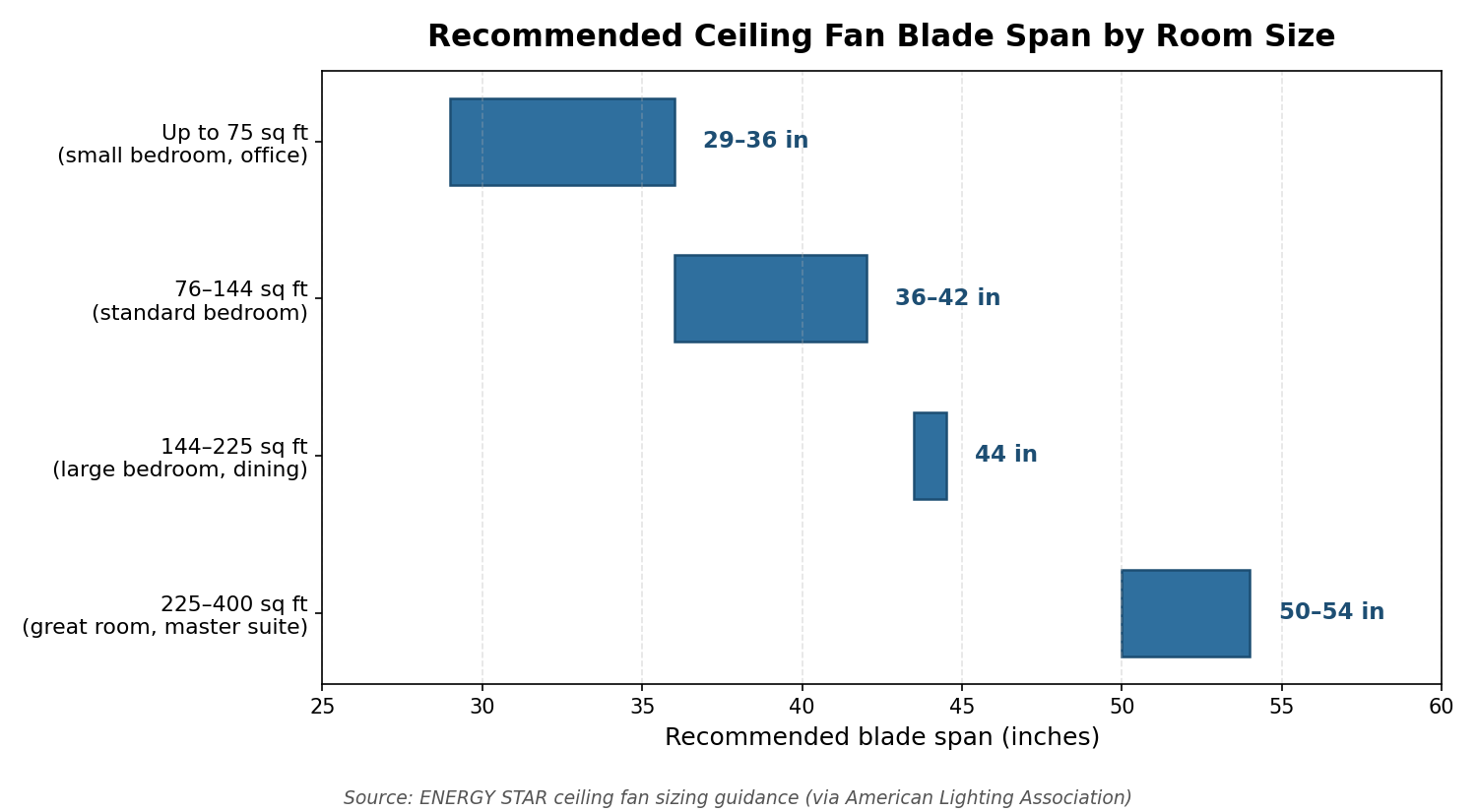
In short: up to 75 sq ft → 29–36 inch blades; 76–144 sq ft → 36–42 inches; 144–225 sq ft → about 44 inches; 225–400 sq ft → 50–54 inches. The chart below visualizes the same widely cited ENERGY STAR sizing data.
Pick the right mounting style
| Mounting Type | Best For | Notes |
|---|---|---|
| Downrod mount | Standard 8–10 ft ceilings | The classic setup. A rigid pipe hangs the fan below the ceiling; swap rod lengths to dial in blade height. |
| Flush mount (hugger) | Low ceilings (8 ft or under) | The motor sits tight against the ceiling, preserving headroom. Slightly less airflow, much safer on low ceilings. |
| Angled ceiling | Vaulted or cathedral ceilings | Uses a special adapter with a longer downrod. Check the spec sheet — most models list a maximum slope angle, and steeper vaults need an angled-ceiling adapter. |
One hard rule for any style: blades should hang 7 to 9 feet above the floor. ENERGY STAR’s ceiling fan basics guidance calls 8–9 feet optimal for airflow, with 7 feet as the minimum for safety. On a standard 8-foot ceiling that usually means a flush-mount fan; on taller ceilings, use a longer downrod.
Step 2: Gather Your Tools and Materials
Tools: stepladder, non-contact voltage tester (non-negotiable), Phillips and flathead screwdrivers, wire strippers, needle-nose pliers, cordless drill, safety glasses and work gloves.
Materials: the ceiling fan kit (motor, blades, downrod, canopy, mounting bracket, hardware), wire connectors (wire nuts — keep spares), electrical tape, and a fan-rated electrical box or fan brace kit if your current box isn’t fan-rated (see Step 4). Add light bulbs if your fan’s light kit doesn’t include them. Family Handyman’s illustrated guide is a handy visual companion for this whole process.
Step 3: Safety First — Turn Off the Power and Verify
Head to your breaker panel and switch off the circuit feeding the room. Don’t just flip the wall switch — it only interrupts one wire, and someone else can flip it back on while you’re working.
Then verify the power is dead with a non-contact voltage tester at the fixture. Test the tester on a known-live outlet first so you know it works, then hold it near each wire in the ceiling box. If it chirps, you killed the wrong breaker — go back and try again. Tape the breaker in the off position and tell everyone in the house to leave the panel alone.
Step 4: Remove the Old Fixture and Check the Electrical Box
With power confirmed off, remove the old fixture’s cover and bulbs, unscrew it from its mounting bracket, and lower it gently. You’ll see two or three wire connections (typically black, white, and ground) joined with wire nuts — unscrew the nuts, separate the wires, and snap a photo of the setup for reference.
Now look at the electrical box. This is the moment of truth. A ceiling fan is heavier than a light fixture and vibrates while spinning — often for decades. A standard plastic or plain metal light box is not designed for that, and manufacturer manuals are blunt: mount the fan only to an outlet box marked “acceptable for fan support.”
- Look inside the box for stamped text like “acceptable for fan support” or a listed weight rating (commonly 35 or 70 lbs).
- If it’s not marked, replace it. Two standard fixes: screw a fan-rated “pancake” box directly to the ceiling joist, or install an expanding fan brace bar through the ceiling hole that grips the joists on both sides and carries a new metal box. The brace bar is the go-to when no joist sits exactly where you want the fan.
- No plastic boxes, ever. Fan-rated boxes are metal and anchored to framing — never just to drywall.
Manufacturer guidance is explicit: mount only to a box marked acceptable for fan support, and the box plus its bracing must fully support the moving fan’s weight (install manuals commonly specify at least 35 lbs of support capacity). Most residential fans weigh 15–30 lbs — well within a proper fan-rated box — but the box still has to be fan-rated. Home Depot’s step-by-step ceiling fan installation guide walks through the brace-and-box method with photos.
Step 5: Mount the Bracket and Assemble the Motor
- Attach the mounting bracket to the fan-rated box with the provided screws. It should sit rock-solid with zero rocking — any play here becomes wobble later.
- Feed the motor wires through the downrod (along with the canopy and coupling cover), then attach the downrod to the motor yoke. Insert the clevis pin, lock it with the cotter/”R” pin, and tighten the set screws firmly.
- Seat the downrod ball into the bracket. Most brackets have a hook that temporarily holds the motor while you wire it — your third hand. Rotate the ball until its slot locks onto the bracket’s tab so the fan can’t twist.
- Re-check every screw on the motor housing. Vibration loosens things over time; starting tight prevents wobble.
Step 6: Wire the Ceiling Fan
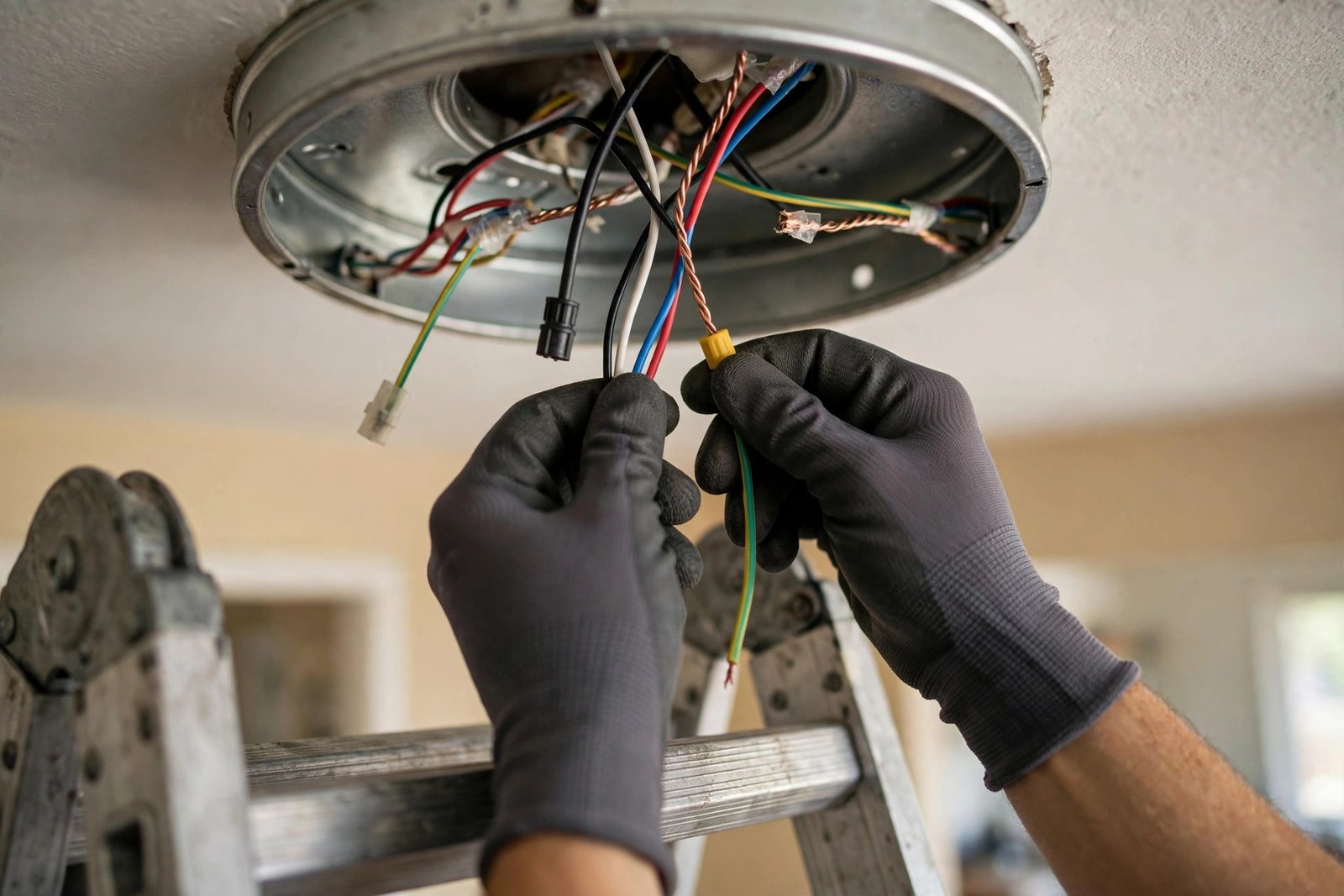
Wiring is simpler than it looks — the colors match up. With the motor hanging from the bracket hook, connect:
- Black to black — the hot wire feeding the fan motor.
- White to white — the neutral.
- Green (or bare copper) to green/bare — the ground. Loop it around the box’s grounding screw first if there is one.
- Blue to black (light kit) — the blue wire powers the light. No light kit? Cap the blue wire with a wire nut and tuck it away.
Strip about 3/4 inch of insulation, twist the copper ends together, screw on the wire nuts until tight, and tug each one gently to confirm it holds. Wrap the base of each connection with electrical tape, then fold the wires carefully into the box — don’t force or pinch them against sharp edges.
Note: this is the US standard color scheme. If your home has older or non-standard wiring (cloth-insulated, aluminum, or unusual colors), confirm it against your local electrical code or call an electrician — mismatched wiring is cheap to have checked and expensive to get wrong.
Step 7: Secure the Canopy, Attach the Blades, Add the Light Kit
Slide the canopy up over the bracket and fasten it with the canopy screws, tightening gradually around the perimeter so it seats evenly. Then attach the blades: screw each blade to its blade iron first, then mount each assembly to the motor housing. Start all screws before fully tightening any of them — this keeps the blades aligned instead of pulling the assembly crooked.
For a light kit, connect its wiring per the manual (usually the same black/white/ground pattern), attach the kit, and install the bulbs and globes. Leave the blades’ protective packaging on until the very end — blades scratch easily while you’re maneuvering the motor.
Step 8: Test, Then Fix Any Wobble or Noise
Restore power at the breaker and test methodically: every speed from low to high, the light kit, and the remote (pair it per the manual, usually within the first minute of power). Let the fan run on high for five minutes. A tiny bit of movement is normal; visible shaking is not.
Most wobbles trace back to something simple:
- Tighten everything. Loose downrod locknuts are one of the most common causes of wobble — check the yoke set screws, ball set screw, and every blade screw first.
- Check blade alignment. Measure from each blade tip to the ceiling; all blades should sit at the same height. A bent blade iron is a frequent culprit and can often be gently bent back.
- Use the balancing kit. Clip the test weight to one blade at a time, run the fan, and move it between blades until the wobble disappears — then stick the adhesive weight at that spot.
- Verify the box itself is solid. If the whole mount moves at the ceiling, the box or brace isn’t anchored properly — take the fan down and fix that before anything else.
For noise: humming on a new fan is often just a loose canopy or globe resonating — tighten them. Clicking usually means a wire or pull chain is tapping a blade; open the canopy and tuck things clear. Persistent electrical hum on all speeds can mean a bad capacitor or a dimmer-style control that isn’t fan-rated — swap it for a proper fan speed control.

Ceiling Fan Direction: Summer vs. Winter
Nearly every modern fan has a small direction switch on the motor housing (flip it only when the fan is fully stopped):
- Summer: counterclockwise (looking up). Pushes air straight down, creating the breeze that cools your skin.
- Winter: clockwise at low speed. Creates a gentle updraft that pushes warm air pooled at the ceiling back down along the walls.
A fan doesn’t lower the room’s temperature — it cools you. That’s why the U.S. Department of Energy notes that running a ceiling fan lets you raise your thermostat about 4°F with no reduction in comfort — the real savings come from the AC running less. And since fans cool people, not rooms, switch them off when you leave. It’s the same efficiency mindset behind other smart home upgrades, whether you’re weighing small bathroom remodel costs or painting a room to refresh your space.
How to Install a Ceiling Fan: DIY vs. Hiring a Pro
| Factor | DIY | Hire an Electrician |
|---|---|---|
| Cost | Just the fan, plus a modest extra outlay if you need a fan-rated box or brace kit | Labor on top of the fan — rates vary widely by market, so get a local quote |
| Time | 1–2 hours for a straightforward swap; half a day if you’re replacing the box | Often under an hour on-site, plus scheduling wait time |
| Beginner-to-intermediate: comfortable on a ladder, careful with wiring | None on your part | |
| Best when | Replacing an existing fixture with wiring already in place | No existing wiring, old or unusual wiring, high/vaulted ceilings, or any doubt about the box |
What you’re really deciding is whether your time and comfort with electrical work are worth the labor savings — the same calculus as unclogging a drain without chemicals versus calling a plumber.
Frequently Asked Questions
Can I install a ceiling fan where a light fixture used to be?
Yes — wiring and a switch are already there, making it the easiest case. The critical check is the electrical box: light-fixture boxes are usually not rated for a fan’s weight and vibration. Confirm the box is marked “acceptable for fan support”; if not, install a fan-rated box or brace kit first.
Do I really need a special electrical box for a ceiling fan?
Yes. Fan-rated boxes are metal, anchored to framing, and marked with a weight rating. Manufacturers universally require a box marked acceptable for fan support, and code guidance requires a listed, weight-marked box for heavier fans.
How long does it take to install a ceiling fan?
A straightforward replacement of an existing fixture takes most DIYers one to two hours. Swapping the electrical box for a fan-rated one or adding a brace bar adds an hour or two. Your first fan always takes longer than your second.
What size ceiling fan do I need for my room?
Measure square footage (length × width). Per widely cited ENERGY STAR guidance: up to 75 sq ft → 29–36 inch blades; 76–144 sq ft → 36–42 inches; 144–225 sq ft → about 44 inches; 225–400 sq ft → 50–54 inches. Keep blades 7–9 feet above the floor.
Why is my new ceiling fan wobbling?
Tighten the downrod locknuts, yoke set screws, and blade screws first — loose hardware is the most common cause. Then check that all blades sit at the same height and use the included balancing kit. If the whole mount moves at the ceiling, the box or brace isn’t secure — take the fan down and fix that.
Which way should a ceiling fan spin in summer and winter?
Counterclockwise in summer to push cooling air down; clockwise on low in winter to recirculate warm air from the ceiling. Flip the direction switch only when the fan is fully stopped, and raise your thermostat a few degrees — the Department of Energy notes you can go about 4°F higher with no loss of comfort.
The Bottom Line
Installing a ceiling fan is one of the highest-payoff DIY projects in the home: a couple of hours, basic tools, year-round comfort. Three non-negotiables: kill the power and verify it’s dead, hang the fan only from a fan-rated box, tighten everything twice. Get those right and the rest is just the manual.